
Image Search Techniques: Advanced Tips for 2026 Visual Hunting
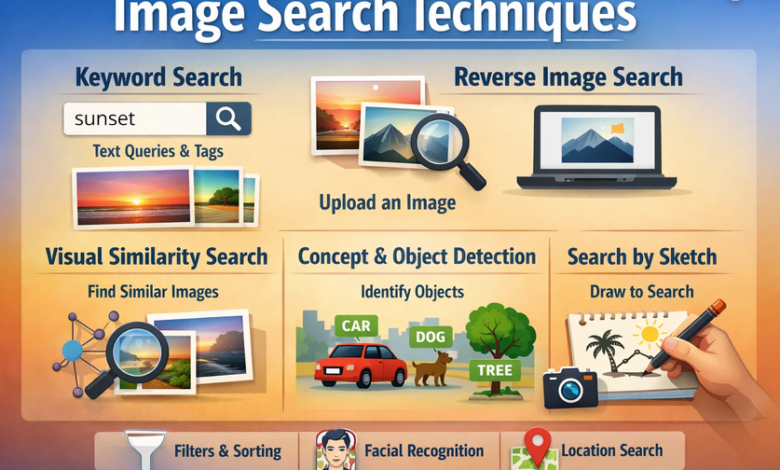
Imagine stumbling upon a stunning photo online, but you have no idea where it came from or how to find similar ones. That’s where image search techniques come in, transforming your curiosity into actionable insights. These methods go beyond simple keyword hunts, leveraging AI and visual analysis to deliver precise results.
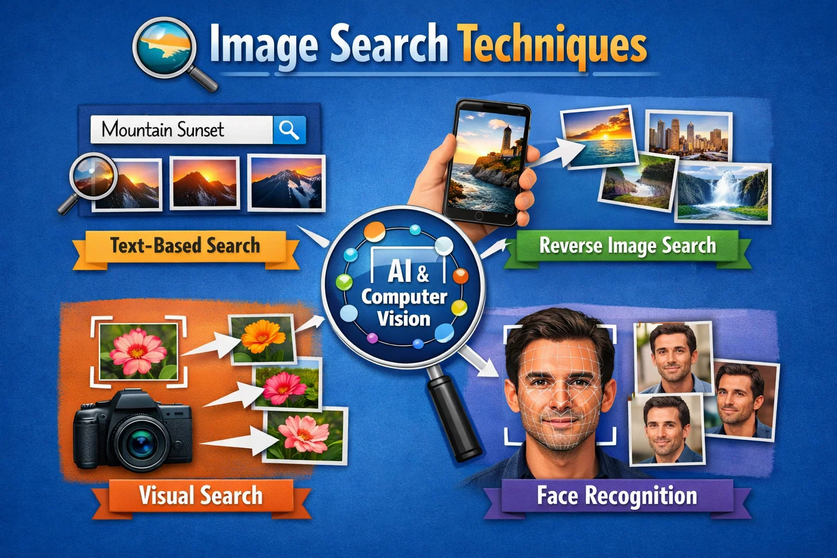
Why Image Search Techniques Matter Today
In 2026, visual content dominates the web, with over 12 billion Google Lens searches monthly. Traditional text searches fall short when dealing with images, memes, products, or landmarks. Image search techniques empower users to verify facts, shop smarter, protect copyrights, and fuel creativity. Whether you’re a researcher tracking sources or a shopper hunting deals, mastering these skills saves time and uncovers hidden gems.
Businesses thrive too. E-commerce sites use visual similarity to boost sales, while creators monitor image theft. As AI evolves, these techniques integrate multimodal inputs—text, voice, images—for richer experiences. Staying ahead means blending human intuition with tech prowess.
Core Types of Image Search Techniques
Reverse Image Search Fundamentals
Reverse image search flips the script: upload a picture, and engines scour the web for matches, edits, or origins. Pioneered by tools like TinEye in 2008, it detects exact copies, crops, and modifications using algorithms like Scale-Invariant Feature Transform (SIFT).
Start by downloading the image or using its URL. Engines analyze pixels, colors, and patterns to find instances across billions of pages. This technique shines for fact-checking viral photos or locating high-res versions. Pro tip: Crop to key details like logos for sharper results.
Visual Similarity and CBIR Explained
Content-Based Image Retrieval (CBIR) powers similarity searches, matching shapes, textures, and colors without metadata reliance. Neural networks extract “deep features,” grouping a sunset beach photo with similar scenes despite variations.
Useful in fashion or decor, it reveals alternatives—like finding chairs in different styles after uploading one. Tools prioritize this for “shop the look” features, enhancing discovery. Combine with filters for size or color to refine outputs.
Object Recognition and OCR Mastery
Advanced image search techniques employ object recognition and OCR (Optical Character Recognition). Identify plants, animals, or text in screenshots effortlessly. Google Lens excels here, processing real-world scans via your camera.
Select objects in images for targeted hunts, or extract quotes from memes. This multimodal approach understands context, like pairing a landmark photo with historical facts. Ideal for researchers or educators verifying visuals.
Top Tools for Effective Image Search
This table compares key players, helping you pick based on needs. Google leads for breadth, while TinEye nails precision.
Step-by-Step Guide: Google Reverse Image Search
Access via images.google.com or the camera icon. Drag-and-drop your image or paste a URL. Results show “Visually similar,” “Pages with exact matches,” and “Find image source.”
Filter by usage rights (labeled for reuse), size (large >3MP), or color (black/white, specific hues). Add keywords like “vintage car” for hybrids. On mobile, Google Lens scans live via camera—point at a sign for instant translation.
For precision, use operators: filetype:png or site:pinterest.com. Cache views reveal removed originals. Expect refined AI in 2026, with predictive overlays.
Advanced Image Search Techniques and Pro Tips
Cropping and Editing for Precision
Crop to isolate elements—like a dress on a model—to avoid distractions. Enhance contrast or remove backgrounds using free editors before uploading. This boosts accuracy in cluttered images.
Zoom into details for high-res sources. Screenshots work when downloads fail; ensure clarity. Screenshot a webpage section to trace embedded visuals.
Combining Keywords with Visuals
Pair uploads with text: “red sneakers Nike” refines similarity results. Use wildcards (*) for variations or quotes for phrases. Regional filters target locales, like US-only fashion.
Stack tools—Google for broad, Yandex for faces. TinEye sorts by oldest upload, revealing origins. Monitor brands via alerts on platforms like TinEye Alerts.
Mobile and Real-Time Techniques
Google Lens on Android/iOS turns your phone into a super-tool. Scan books for reviews, translate menus, or identify songs from album art. 2026 updates add AR overlays and personalization.
Bing integrates shopping; tap outfits for buys. Voice-combine: “What plant is this?” while scanning. Multimodal trends blend image+text for context.
Image Search for SEO and Content Creators
Optimize your images to appear in searches. Use descriptive filenames (seo-optimized-image.jpg), alt text (70 chars, keywords), and compress via WebP for speed.
Add schema markup (ImageObject, Product) for rich results. Submit to sitemaps.xml. Unique visuals rank higher; avoid stock photos. Lazy-load and responsive serve boost UX.
Track performance with Google Search Console. Visual SEO drives 25%+ traffic in niches like e-commerce. Caption near relevant text aids crawling.
Emerging Trends in Image Search Techniques
By 2026, multimodal AI dominates: image+voice queries yield diagrams or videos. Generative AI detects fakes, predicts intent.
Pinterest-style visual graphs cluster similars. Privacy-focused engines rise. CBIR evolves with deeper neural nets for abstract matches.
Ethical AI verifies deepfakes. Brands optimize for Lens with structured data. Expect camera-as-searchbar ubiquity.
Common Pitfalls and How to Avoid Them
Overly broad uploads yield noise; always crop. Low-res images flop—aim for 1MP+. Irrelevant results? Layer filters and keywords.
Privacy matters: Tools store uploads temporarily; use incognito. Not all detect heavy edits. Cross-verify across engines.
Conclusion
Mastering image search techniques opens a world of efficiency and discovery in our visual web. From reverse hunts to AI-powered Lens scans, these methods adapt to 2026‘s multimodal future. Practice across tools, refine with tips, and watch your searches supercharge productivity. Dive in today—your next breakthrough awaits in a single upload.
Frequently Asked Questions (FAQs)
What is the best tool for reverse image search?
Google Images excels for most users due to its vast database and filters, but TinEye wins for exact matches and copyright tracking.
How does Yandex image search differ from Google?
Yandex shines in facial recognition, object selection, and high-res results, especially for non-Western content.
Can I use image search on mobile?
Yes, Google Lens and Bing apps enable camera-based real-time searches for objects, text, and translations.
How do I optimize images for search visibility?
Use keyword-rich filenames, alt text, WebP format, and schema markup; compress for speed.
What are future image search trends in 2026?
Multimodal AI (image+text+voice), deepfake detection, and personalized visual discovery lead the way.
Is TinEye better than Google for image origins?
TinEye tracks modifications and oldest uploads precisely, ideal for creators.
Get more updates or Stories on Next Magazine