
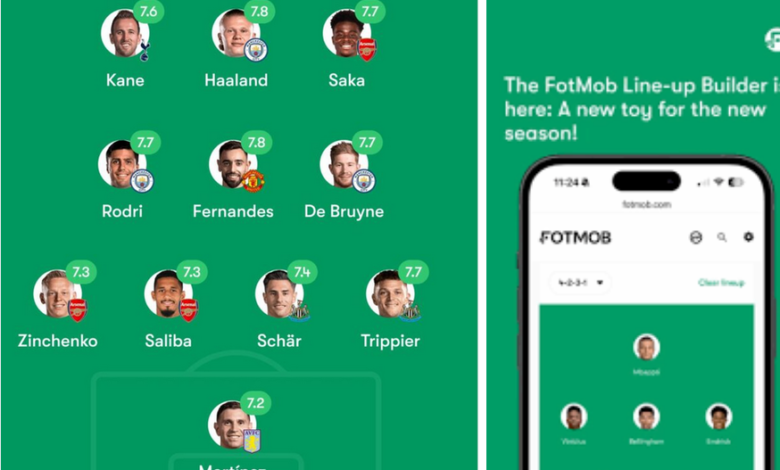
Imagine having the tactical board of Pep Guardiola, the squad depth of Carlo Ancelotti, and the creativity of a fantasy football champion—all in your pocket. That is the appeal of the fotmob lineup builder, a powerful feature inside the widely popular FotMob app. Designed for football lovers who want more than just live scores, this tool allows you to build, customize, analyze, and share your own starting XI with professional-level detail.
Whether you are predicting a Premier League showdown, preparing for a fantasy draft, or debating your club’s best formation with friends, this guide will walk you through everything you need to know about using the lineup builder effectively in 2026.
What Is FotMob Lineup Builder?
The fotmob lineup builder is an interactive squad creation tool integrated within the FotMob football app. FotMob itself has grown into one of the world’s leading football platforms, serving millions of fans with live scores, match stats, player ratings, and transfer updates. The lineup builder extends that ecosystem by giving users a tactical playground.
Instead of simply reading match previews, you can construct your own formation, drag players into position, and visually simulate a team setup. The tool pulls from a massive database covering over 100 global leagues, including domestic competitions and international tournaments.
Its simplicity is a major advantage. You can either start with a blank pitch or auto-fill an official team lineup. From there, you customize your squad based on tactics, player form, or personal preference.

Why Football Fans Love This Tool
Football discussions rarely stop at the final whistle. Fans constantly debate starting elevens, bench strength, and tactical adjustments. The fotmob lineup builder transforms those conversations into interactive experiences.
Instead of arguing verbally, you can visually present your ideal team. For example, you might:
- Replace an underperforming striker
- Shift to a 4-3-3 attacking formation
- Introduce a young academy talent
- Experiment with inverted fullbacks
Because it connects to real-time player data, your lineup reflects current transfers, injuries, and form ratings. That makes it far more reliable than static lineup generators found elsewhere online.

Step-by-Step Guide to Using FotMob Lineup Builder
Getting started is straightforward, even for beginners. Within minutes, you can build a professional-looking squad graphic ready for sharing.
Step 1: Access the Lineup Section
Open the FotMob app on iOS or Android and navigate to the lineup builder tab. If using the web version, ensure you are logged in for full functionality. The interface displays a digital pitch with selectable formations.
Step 2: Choose a Formation
You can select from popular tactical setups such as:
- 4-4-2
- 4-3-3
- 3-5-2
- 4-2-3-1
- 5-3-2
Advanced users can manually adjust positioning nodes to create hybrid systems. This flexibility allows you to replicate modern tactical trends like false nines or inverted wingers.
Step 3: Add Players
Click on any position and search for a player by name, club, nationality, or role. The database includes:
- Top-tier professionals
- Youth prospects
- Women’s league players
- International stars
Each profile displays current form ratings and team affiliation, helping you make informed choices.
Step 4: Customize and Save
You can assign captaincy, adjust jersey visuals, and add substitutes. Once satisfied, save your lineup or export it as a high-resolution image for sharing.
Key Features That Set It Apart
The fotmob lineup builder offers more than just drag-and-drop convenience. Its integration with the broader FotMob ecosystem enhances its value significantly.
Important features include:
- Real-time player data synchronization
- Visual pitch customization
- Integration with match statistics
- Access to international and women’s competitions
- Shareable PNG exports
Unlike standalone lineup creators, this tool operates within a live football data environment. That connection ensures relevance and accuracy.
Integration with Live Match Data
One of the strongest advantages is its connection to live match tracking. After building your predicted XI, you can compare it with official lineups once matches begin. FotMob provides:
- Player ratings
- Expected goals (xG) metrics
- Heatmaps
- Substitution timelines
This allows fans to evaluate how accurate their predictions were. It turns passive viewing into active tactical analysis.
Using FotMob Lineup Builder for Fantasy Football
Fantasy football managers constantly seek strategic advantages. Visualizing your squad structure can reveal weaknesses that raw data might not show.
For fantasy preparation, you can:
- Identify positional imbalance
- Plan bench rotations
- Evaluate captain choices
- Simulate transfer changes
Because player ratings update frequently, you can prioritize in-form athletes. This practical application has made the lineup builder especially popular during UEFA Champions League and domestic league seasons.
Tactical Experimentation and Learning
Beyond entertainment, the fotmob lineup builder serves as an educational tool. Aspiring coaches and analysts can test tactical ideas visually before implementing them in real-world scenarios.
For example, you might explore:
- High-pressing systems
- Defensive low blocks
- Midfield overloads
- Counterattacking shapes
By rearranging player roles and spacing, users gain a clearer understanding of positional play concepts that define modern football.
Social Media and Community Engagement
Football thrives on community discussion. The lineup builder enhances engagement by enabling visual storytelling. After exporting your lineup image, you can share it on:
- WhatsApp groups
Many fans use it to spark debates before big matches. Content creators and bloggers frequently embed lineup graphics in tactical breakdowns or match previews.
Common Mistakes to Avoid
While intuitive, users sometimes make tactical or structural errors. Avoid these common pitfalls:
- Overloading attacking players without midfield balance
- Ignoring defensive coverage
- Selecting injured or suspended players
- Forgetting to save progress
- Overcomplicating formations unnecessarily
Maintaining balance across all positions ensures your lineup appears realistic and strategically sound.
Comparing FotMob Lineup Builder with Other Tools
Several lineup creators exist online, but most lack integration with live football data. Compared to competitors, FotMob offers:
- Larger global player database
- Real-time form updates
- Direct connection to match statistics
- Mobile-optimized performance
- Free access without paywalls
Standalone tools may offer flashy graphics, but they often lack data depth. FotMob combines visual appeal with credible football information.
Evolution of the Lineup Builder
Since its introduction within FotMob’s growing ecosystem, the lineup feature has evolved significantly. Key milestones include:
- Addition of player faces
- Expanded women’s league support
- Enhanced formation flexibility
- Improved export quality
- Performance optimization for modern devices
With over 50 million global users, FotMob continues refining the experience based on community feedback.
The Future of FotMob Lineup Builder
Looking ahead to late 2026 and beyond, enhancements may include:
- AI-generated tactical suggestions
- Augmented reality pitch previews
- Deeper analytics overlays
- Collaborative team-building sessions
- Advanced performance simulation tools
As football technology advances, interactive tactical tools are becoming central to fan engagement.
Why It Matters in 2026
Football fandom has evolved beyond passive consumption. Supporters want participation, analysis, and creative control. The fotmob lineup builder empowers fans to step into managerial roles, even if only virtually.
By combining accurate player databases, intuitive design, and social sharing capabilities, it transforms match preparation into an interactive experience. In a digital age where engagement drives loyalty, tools like this redefine how supporters connect with the sport.
Conclusion
The fotmob lineup builder is more than a fun add-on inside a football app—it is a tactical playground for modern fans. Whether you’re predicting a derby clash, preparing your fantasy squad, or exploring innovative formations, this feature provides the tools to visualize your football ideas clearly.
Its seamless integration with live data, user-friendly interface, and global player coverage make it one of the most practical lineup tools available in 2026. If you want to elevate your football discussions and strategic thinking, building your own XI is the perfect place to start.
Frequently Asked Questions
1. Is the fotmob lineup builder free to use?
Yes, it is available within the FotMob app without additional charges.
2. Does it include women’s football leagues?
Yes, recent updates expanded support for major women’s competitions.
3. Can I export my lineup as an image?
Yes, you can save and share high-quality images of your squad.
4. Does it update player transfers automatically?
Yes, the database syncs with current transfer and roster updates.
5. Is it suitable for fantasy football planning?
Absolutely. It helps visualize team balance and rotation strategies.
6. Can I create custom formations?
Yes, you can modify preset formations or design unique tactical shapes.
7. Is it available on desktop?
While optimized for mobile apps, limited web functionality is available.
Get more updates or Stories on Next Magazine